How Databases Store Your Data: Building a Hash Index Engine from Scratch

I am a developer from Nigeria interested in mobile technologies, backend development, and system designs. I am currently Fluttering fulltime @Chore Technologies.
"Future users of large data banks must be protected from having to know how the data is organized in the machine."
— Edgar F. Codd, Inventor of the Relational Model
This quote from Edgar F. Codd, the inventor of the relational data model, is now a fulfilled prophecy in modern computing, as the simplicity of database systems has abstracted the complexity and intricacy of data storage away from users. However, for those who build large systems and need knowledge of the hidden to trade pros and cons and squeeze out every possible drop of optimization, such ignorance is simply unaffordable.
In this 4-part series, I will take you through the foundations of data storage, build 3 simple production-grade storage engines, and pull back the curtain to give you a glimpse of how data is stored behind the scenes.
The Foundation: In-Memory Key-Value Storage
Suppose a system requires deterministic data storage—for instance, a global air traffic system that needs the details of all airplanes in the sky via their unique tail numbers, instantly. The simplest way to store this data in most programming languages is to create a data type for the airplane that contains the required information, and store it in a hash map (dictionary in some languages) with the airplane's tail number as the key.
This is fairly straightforward and indeed the foundation of in-memory Key-Value stores.
However, the storage engine needs to persist data to disk for durability and recovery in the event of a crash of the host machine, or when it needs to reboot, for easy replication (so the system is fault-tolerant), or even for backups in the cloud in case the hardware system gets damaged—all of which can't be handled with just in-memory storage.
How would you handle this?
Append-Only Logging
To start with, the storage engine can continuously write all new updates to a file, keep the key mapped to the location where its value is stored, and can be read from the file. This is called Append-only Logging—no data is ever overwritten; the system must append new data to the end of the file.
To read and write to a file deterministically, a recording format must be defined, which essentially specifies how data is stored and can be read from the file. The storage engine will accept dynamic key and value sizes, so it must store the sizes along with the values and keys as part of the record. In addition, it is also a good idea to store the action's timestamp, as you will see later.
This results in a recording format like below:
[CRC32][Timestamp][KeySize][ValueSize][Key][Value]
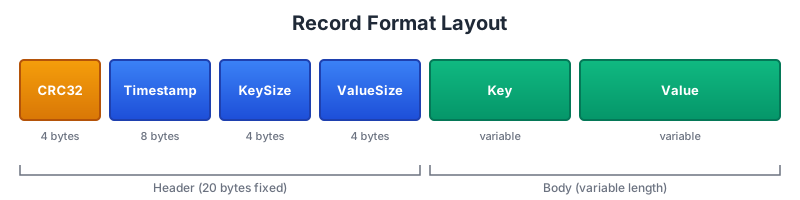
CRC32 is a Cyclic Redundancy Check, a mathematical checksum computed from the rest of the data in a specific record. It is calculated at the point of writing the data and recalculated during reading to ensure the same data that was written is the same data being read, without any corruption or tampering. It also protects against partial writes. Imagine the power goes out exactly halfway through the computer writing a large 10MB "Value" to the disk. Without CRC32, the database might reboot, read the half-finished data, and assume it's valid, leading to a crash or logical errors. But with CRC32, the checksum calculated from the partial data won't match the checksum stored at the start of the record. The database will see the mismatch and safely discard the "zombie" record.
Writing Records to the Log
When you want to append data to the log, the logic looks like this:
Step 1: Serialize the metadata into a byte buffer
timestamp := time.Now().Unix()
keySize := uint32(len(key))
valueSize := uint32(len(value))
Step 2: Calculate the CRC32 of that buffer
crcData := make([]byte, 0, 8+4+4+len(key)+len(value))
tmpBuf := make([]byte, 8)

binary.LittleEndian.PutUint64(tmpBuf, uint64(timestamp))
crcData = append(crcData, tmpBuf...)

binary.LittleEndian.PutUint32(tmpBuf, keySize)
crcData = append(crcData, tmpBuf[:4]...)

binary.LittleEndian.PutUint32(tmpBuf, valueSize)
crcData = append(crcData, tmpBuf[:4]...)

crcData = append(crcData, key...)
crcData = append(crcData, value...)

crc := crc32.ChecksumIEEE(crcData)
Step 3: Prepend the 4-byte CRC32 result to the start of the record
// headerSize = 4 + 8 + 4 + 4 // crc + timestamp + keysize + valuesize
header := make([]byte, headerSize)
binary.LittleEndian.PutUint32(header[0:4], crc)

// Prepend the timestamp, keysize and valuesize
binary.LittleEndian.PutUint64(header[4:12], uint64(timestamp))
binary.LittleEndian.PutUint32(header[12:16], keySize)
binary.LittleEndian.PutUint32(header[16:20], valueSize)
Step 4: Write the entire packet to the end of your log file
offset := s.size.Load()

// Write header
if _, err := file.Write(header); err != nil {
    return 0, 0, err
}

// Write key and value
if _, err := file.Write(key); err != nil {
    return 0, 0, err
}

if _, err := file.Write(value); err != nil {
    return 0, 0, err
}

s.size.Add(int64(recordSize))
This append function must return the length of the data written (recordSize) and the point to start reading it in the file (offset).
Reading Records from the Log
To read a record from a file given an offset, the logic looks like this:
Step 1: Read the Header
file := s.file.Load()
if file == nil {
    return nil, fmt.Errorf("segment file closed")
}

// Read header
header := make([]byte, headerSize)
if _, err := file.ReadAt(header, offset); err != nil {
    return nil, err
}

crcStored := binary.LittleEndian.Uint32(header[0:4])
timestamp := binary.LittleEndian.Uint64(header[4:12])
keySize := binary.LittleEndian.Uint32(header[12:16])
valueSize := binary.LittleEndian.Uint32(header[16:20])
Step 2: Read the body
data := make([]byte, keySize+valueSize)
if _, err := file.ReadAt(data, offset+headerSize); err != nil {
    return nil, err
}
Step 3: Integrity Check
crcData := make([]byte, 0, 8+4+4+len(data))
tmpBuf := make([]byte, 8)

binary.LittleEndian.PutUint64(tmpBuf, timestamp)
crcData = append(crcData, tmpBuf...)

binary.LittleEndian.PutUint32(tmpBuf, keySize)
crcData = append(crcData, tmpBuf[:4]...)

binary.LittleEndian.PutUint32(tmpBuf, valueSize)
crcData = append(crcData, tmpBuf[:4]...)

crcData = append(crcData, data...)

crcCalculated := crc32.ChecksumIEEE(crcData)
if crcCalculated != crcStored {
    return nil, fmt.Errorf("CRC mismatch: stored=%x calculated=%x", crcStored, crcCalculated)
}
Step 4: Return the data
// Return value (skip key)
value := data[keySize:]
return value, nil
Reading from the file is done via a byte offset rather than the key, which means the engine needs to know the offset of a given data item before it can read it, since searching a file is expensive and not scalable. This is why, in addition to writing to disk, the engine has to keep a hash index of the offset-to-key mapping in memory to offset disk I/O costs and improve performance.
Handling Deletes: Tombstones
What happens when a value needs to be deleted? A delete is as simple as writing a null or empty value for a given key, so the append operation with an empty value already covers the delete. This action is referred to as "marking a tombstone" in database terminology.
Putting It All Together
A working read and write on this simple engine looks like this:
type indexEntry struct {
    offset    int64
    size      int32
    timestamp int64
}

var hashMap map[string]*indexEntry

func Put(key, value []byte) error {
    if len(key) == 0 {
        return common.ErrKeyEmpty
    }

    offset, recordSize, err := append(key, value)
    if err == nil {
        hashMap[string(key)] = &indexEntry{
            offset:    offset,
            size:      recordSize,
            timestamp: time.Now().Unix(),
        }
        return nil
    }
    return err
}

func Delete(key []byte) error {
    return Put(key, nil)
}

func Get(key []byte) ([]byte, error) {
    entry, exists := hashMap[string(key)]
    if !exists {
        return nil, common.ErrKeyNotFound
    }

    value, err := read(entry.offset)
    if err != nil {
        return nil, err
    }

    // Check for tombstone
    if value == nil || len(value) == 0 {
        return nil, common.ErrKeyNotFound
    }

    return value, nil
}
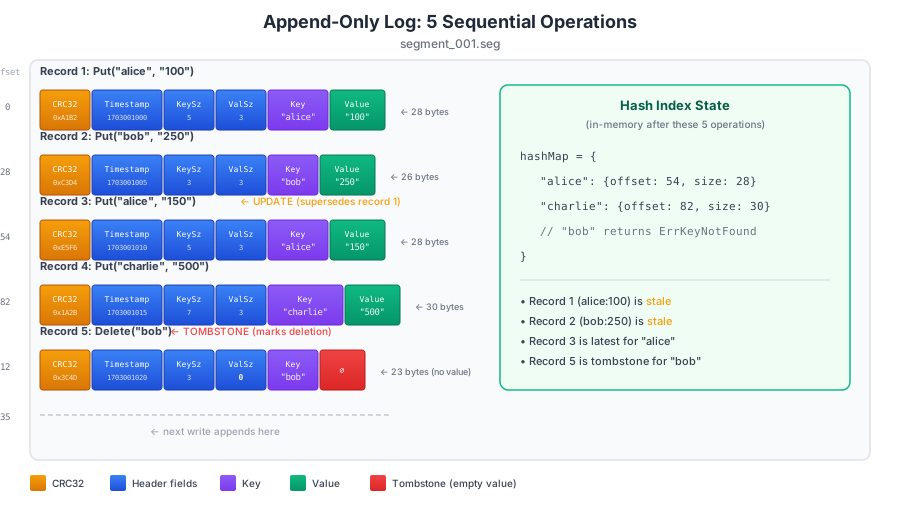
Believe it or not, this is a working KV database system. However, more optimizations are needed to make this functional and close to what real systems use.
Segmentation: Chunking the Log Files
What happens when dealing with huge and heavy data? Continuously opening, reading, and writing heavy files will be too expensive and slow. The solution is to chunk the logs (the files written to) and figure out how to manage these chunks.
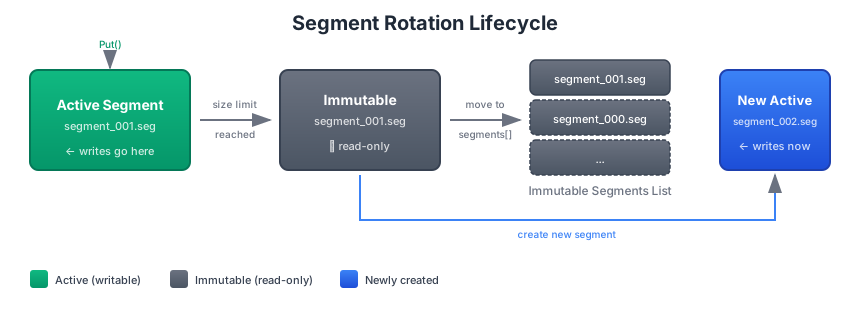
Define a certain size for the log files, which will then serve as the breakpoint and chunk size. This chunk is called a segment. The engine would then need to keep track of all these segments, the paths to each segment's log files, and direct each new data written to the segment it belongs to.
When the storage engine starts, it creates a fresh segment and keeps writing to it until it is full. This is called the Active Segment. When the active segment is full, the engine creates a new segment, closes the old segment for further writing (making it immutable), and moves the old segment to an internal list of segments. This process is called segment rotation.
The Segment Structure
type segment struct {
    id   int
    path string

    // File handle (protected by atomic operations)
    file   atomic.Pointer[os.File]
    size   atomic.Int64
    closed atomic.Bool

    // Reference counting for safe deletion
    refCount atomic.Int32
    mu       sync.RWMutex // Protects file operations
}

func newSegment(id int, path string, file *os.File) *segment {
    s := &segment{
        id:   id,
        path: path,
    }
    s.file.Store(file)
    s.refCount.Store(1)
    return s
}
Updated Index Entry
With segmentation introduced, the index entry needs a segment identifier:
type indexEntry struct {
    segmentID int
    offset    int64
    size      int32
    timestamp int64
}
Writing with Segment Rotation
func Put(key, value []byte) error {
    if len(key) == 0 {
        return common.ErrKeyEmpty
    }

    if activeSeg != nil && activeSeg.Size() < config.SegmentSizeBytes {
        offset, recordSize, err := activeSeg.append(key, value)
        if err == nil {
            hashMap[string(key)] = &indexEntry{
                segmentID: activeSeg.Id,
                offset:    offset,
                size:      recordSize,
                timestamp: time.Now().Unix(),
            }
            return nil
        }
    }

    return putWithRotation(key, value)
}

func putWithRotation(key, value []byte) error {
    // Obtain a lock before writing
    segmentMu.Lock()
    defer segmentMu.Unlock()

    // Check again after acquiring lock (another goroutine may have rotated)
    if activeSeg != nil && activeSeg.Size() < config.SegmentSizeBytes {
        offset, recordSize, err := activeSeg.append(key, value)
        if err != nil {
            return err
        }

        hashMap[string(key)] = &indexEntry{
            segmentID: activeSeg.id,
            offset:    offset,
            size:      recordSize,
            timestamp: time.Now().Unix(),
        }
        return nil
    }

    // Need to rotate
    if err := rotateSegment(); err != nil {
        return err
    }

    // Write to new active segment
    offset, recordSize, err := activeSeg.append(key, value)
    if err != nil {
        return err
    }

    hashMap[string(key)] = &indexEntry{
        segmentID: activeSeg.id,
        offset:    offset,
        size:      recordSize,
        timestamp: time.Now().Unix(),
    }
    return nil
}

func rotateSegment() error {
    if activeSeg == nil {
        return fmt.Errorf("no active segment")
    }

    if err := activeSeg.sync(); err != nil {
        return err
    }

    segmentsMu.Lock()
    newSegments := make([]*segment, len(*oldSegments)+1)
    copy(newSegments, *oldSegments)
    newSegments[len(*oldSegments)] = activeSeg
    segments.Store(&newSegments)
    segmentsMu.Unlock()

    // Create new active segment
    newSeg, err := h.createSegment()
    if err != nil {
        return err
    }

    activeSegment.Store(newSeg)
    return nil
}
Reading with Segments
func Get(key []byte) ([]byte, error) {
    entry, exists := hashMap[string(key)]
    if !exists {
        return nil, common.ErrKeyNotFound
    }

    activeSeg := h.activeSegment.Load()
    var seg *segment

    if entry.segmentID == activeSeg.id {
        seg = activeSeg
    } else {
        segments := h.segments.Load()
        for _, s := range *segments {
            if s.id == entry.segmentID {
                seg = s
                break
            }
        }
    }

    if seg == nil {
        return nil, fmt.Errorf("segment %d not found", entry.segmentID)
    }

    value, err := seg.read(entry.offset)
    if err != nil {
        return nil, err
    }

    // Check for tombstone
    if value == nil || len(value) == 0 {
        return nil, common.ErrKeyNotFound
    }

    return value, nil
}
Compaction: Reclaiming Dead Space
While the append-only logging model offers incredible write performance, it introduces significant storage overhead: data redundancy.
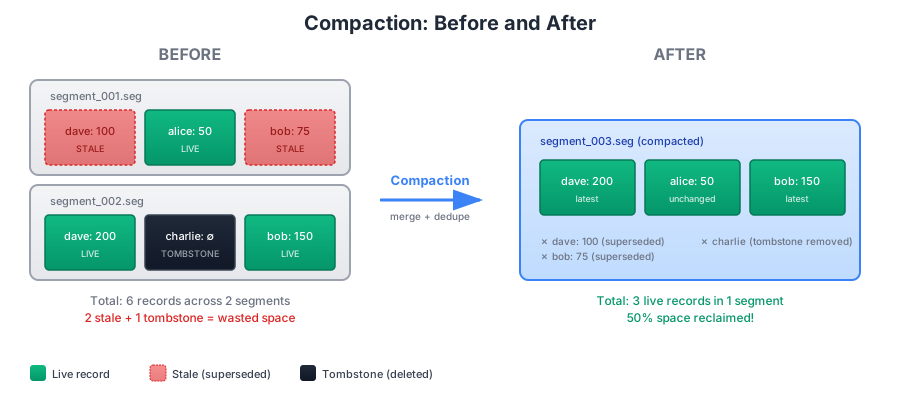
Consider a scenario where the value 100 is assigned to the key dave. Later, that same key is updated with the value 200. From the user's perspective, the data has been "overwritten"—a query for dave correctly returns 200. However, deep within the immutable log segments, the stale value 100 still occupies physical disk space. In a high-velocity system, these "dead" records can accumulate rapidly, eventually exhausting storage with data that is no longer reachable.
To reclaim this space, the engine implements a process known as Compaction. Once a predetermined number of segments have been closed and marked as immutable, a background process merges these files. During this merge, the system compares records sharing the same key and retains only the entry with the most recent timestamp, effectively discarding all previous iterations.
Compaction also serves as the final cleanup for Tombstone records. When the compaction engine encounters a tombstone, it simply skips that record and its predecessors, permanently removing them from the physical log. Because this process operates exclusively on closed, immutable segments, it can be executed as a low-priority background task, ensuring that storage maintenance never compromises the database's live performance.
func (h *HashIndex) compactSegments(segments []*segment) (*segment, map[string]*indexEntry, error) {
    latestValues := make(map[string][]byte)

    for _, seg := range segments {
        offset := int64(0)
        segSize := seg.Size()

        for offset < segSize {
            key, value, nextOffset, err := seg.readRecord(offset)
            if err != nil {
                if err == io.EOF {
                    break
                }
                return nil, nil, fmt.Errorf("error reading segment %d: %w", seg.id, err)
            }

            latestValues[string(key)] = value
            offset = nextOffset
        }
    }

    // Create new compacted segment
    newSeg, err := h.createSegment()
    if err != nil {
        return nil, nil, err
    }

    // Write all latest values to new segment
    newIndex := make(map[string]*indexEntry)
    compactionBytesWritten := int64(0)

    for key, value := range latestValues {
        // Skip tombstones (deleted keys have nil or empty value)
        if value == nil || len(value) == 0 {
            continue
        }

        offset, size, err := newSeg.append([]byte(key), value)
        if err != nil {
            newSeg.close()
            os.Remove(newSeg.path)
            return nil, nil, err
        }

        newIndex[key] = &indexEntry{
            segmentID: newSeg.id,
            offset:    offset,
            size:      size,
            timestamp: time.Now().Unix(),
        }

        compactionBytesWritten += int64(size)
    }

    h.stats.bytesWrittenToDisk.Add(compactionBytesWritten)

    if err := newSeg.sync(); err != nil {
        newSeg.close()
        os.Remove(newSeg.path)
        return nil, nil, err
    }

    return newSeg, newIndex, nil
}
Understanding Amplification: The Hidden Costs
When evaluating storage engines, two critical metrics often determine whether a system is viable for production: write amplification and space amplification. Understanding these tradeoffs is essential for choosing the right storage engine for your workload.
Write Amplification
Write amplification is the ratio of total bytes written to disk versus the logical bytes the user intended to write. In an ideal world, writing 1 MB of user data would result in exactly 1 MB written to disk—a write amplification of 1.0x. In practice, this is rarely achievable.
In this hash index engine, write amplification comes from two sources:
Record overhead: Every value written includes a header (CRC32, timestamp, key size, value size) plus the key itself. For small values, this overhead can be significant. A 10-byte value with a 10-byte key and 20-byte header results in 40 bytes written for 10 bytes of actual data—a 4x amplification just from formatting.
Compaction rewrites: When compaction runs, it reads all records from multiple segments and rewrites the surviving data to a new segment. If you update a key 10 times before compaction, you've written 10 records to disk, but only 1 survives. The data was effectively written twice: once during normal operations, and once during compaction.
Write Amplification = Total Bytes Written to Disk / Logical Bytes Written by User
The benchmarks show write amplification between 1.59x and 2.35x, which is quite good. The append-only model actually helps here—sequential writes are efficient, and there are no random overwrites. Systems using in-place updates (like B-trees) often see write amplification of 10x or higher due to page splits and rebalancing.
Space Amplification
Space amplification is the ratio of total disk space used versus the logical size of the live data. This measures how much "dead" space accumulates before compaction reclaims it.
Space Amplification = Total Disk Space Used / Size of Live Data
In this engine, space amplification grows between compaction cycles:
Every update creates a new record while the old one remains on disk
Every delete adds a tombstone without immediately freeing space
Stale data accumulates until compaction runs
Consider a workload that repeatedly updates the same 1,000 keys. If each key-value pair is 100 bytes and 1 million updates occur before compaction:
Live data: 1,000 keys × 100 bytes = 100 KB
Disk usage: 1,000,000 records × 100 bytes = 100 MB
Space amplification: 1,000x
This extreme example illustrates why compaction frequency matters. In practice, you tune the compaction threshold based on your tolerance for space amplification versus the CPU cost of running compaction more frequently.
The Tradeoff Triangle
Storage engines constantly balance three competing concerns:
| Concern | Hash Index Behaviour |
| Write Performance | Excellent—O(1) sequential appends |
| Write Amplification | Good (1.5x–2.5x)—no in-place updates |
| Space Amplification | Variable—depends on compaction frequency |
The append-only design optimizes for write performance and reasonable write amplification at the cost of temporary space amplification. This tradeoff is ideal for write-heavy workloads where disk space is cheaper than write latency.
Practical Implications
When deploying a hash index engine in production, consider:
Provision 2–3x the expected data size for disk space to accommodate space amplification between compaction cycles
Monitor the ratio of live keys to total records—when this drops below 50%, compaction provides significant space savings
Schedule compaction during low-traffic periods since it consumes CPU and I/O bandwidth, though it runs on immutable segments and doesn't block writes
For update-heavy workloads, consider more aggressive compaction thresholds to keep space amplification in check.
Recovery: Rebuilding from Disk
There is one last core aspect that needs to be considered before this storage engine is ready for use: how does it handle recovery and restart?
The answer is simple. To recover the database, the recovery process scans the root directory containing the segment files on the host machine. Since the segment files are named with a sequential identifier, this identifier can be used to order the files correctly. The process then runs through these segments from oldest to newest, reads individual records to rebuild the hash index of the keys, and the database is ready for action.
func (h *HashIndex) recover() error {
    // List all segment files
    files, err := os.ReadDir(h.config.DataDir)
    if err != nil {
        return err
    }

    // Parse segment IDs and sort by timestamp (oldest first)
    type segmentInfo struct {
        id   int
        path string
    }
    segmentInfos := make([]segmentInfo, 0)

    for _, file := range files {
        if file.IsDir() || !strings.HasSuffix(file.Name(), ".seg") {
            continue
        }

        // Parse segment ID from filename (e.g., "1234567890.seg")
        idStr := strings.TrimSuffix(file.Name(), ".seg")
        id, err := strconv.Atoi(idStr)
        if err != nil {
            continue // Skip invalid files
        }

        path := filepath.Join(h.config.DataDir, file.Name())
        segmentInfos = append(segmentInfos, segmentInfo{id: id, path: path})
    }

    // Sort by ID (timestamp order)
    sort.Slice(segmentInfos, func(i, j int) bool {
        return segmentInfos[i].id < segmentInfos[j].id
    })

    if len(segmentInfos) == 0 {
        return nil // No segments to recover, will create new one
    }

    // Recover all segments
    recoveredSegments := make([]*segment, 0)
    latestValues := make(map[string]*indexEntry)

    for i, info := range segmentInfos {
        isLastSegment := i == len(segmentInfos)-1

        var file *os.File
        if isLastSegment {
            // Active segment: needs append capability for new writes
            file, err = os.OpenFile(info.path, os.O_RDWR|os.O_APPEND, 0644)
        } else {
            // Immutable segments: read-only
            file, err = os.OpenFile(info.path, os.O_RDWR, 0644)
        }
        if err != nil {
            return fmt.Errorf("failed to open segment %s: %w", info.path, err)
        }

        stat, err := file.Stat()
        if err != nil {
            file.Close()
            return fmt.Errorf("failed to stat segment %s: %w", info.path, err)
        }

        seg := newSegment(info.id, info.path, file)
        seg.size.Store(stat.Size())

        // Scan segment and build index
        offset := int64(0)
        for offset < stat.Size() {
            key, _, nextOffset, err := seg.readRecord(offset)
            if err != nil {
                if err == io.EOF {
                    break
                }
                // Corruption detected, truncate at this point
                fmt.Printf("Warning: corruption in segment %d at offset %d, truncating\n", seg.id, offset)
                if err := file.Truncate(offset); err != nil {
                    fmt.Printf("Failed to truncate segment %d: %v\n", seg.id, err)
                }
                seg.size.Store(offset)
                break
            }

            recordSize := int32(nextOffset - offset)
            latestValues[string(key)] = &indexEntry{
                segmentID: seg.id,
                offset:    offset,
                size:      recordSize,
                timestamp: time.Now().Unix(),
            }

            offset = nextOffset
        }

        recoveredSegments = append(recoveredSegments, seg)
    }

    // The last segment becomes the active segment
    if len(recoveredSegments) > 0 {
        activeSeg := recoveredSegments[len(recoveredSegments)-1]
        h.activeSegment.Store(activeSeg)

        if len(recoveredSegments) > 1 {
            immutableSegs := recoveredSegments[:len(recoveredSegments)-1]
            h.segments.Store(&immutableSegs)
        }
    }

    // Rebuild index from latest values
    for key, entry := range latestValues {
        if entry.size == 0 {
            continue // Skip tombstones
        }
        h.index.Put(key, entry)
    }

    fmt.Printf("Recovered %d segments, %d keys\n", len(recoveredSegments), h.index.Count())
    return nil
}
Further Optimizations: Sharding the Hash Map
And that is it—you have a complete working hash index data storage engine. However, each component can be further optimized to squeeze out as much performance as possible.
When working with concurrent systems in which different processes can read and write to the same source, a locking mechanism is needed to ensure data consistency. In this Go implementation, a RWMutex is used to synchronize data access. However, locking and unlocking are time-consuming actions that can drastically reduce throughput and performance, especially for writes.
One way to improve this is to shard (or partition) the in-memory hash map. By sharding the HashMap into 256 different shards, each with its own lock, the single resource lock is eliminated, and the read/write surface is expanded significantly. Concurrent processes can fetch data from different sources, reducing the time spent waiting for a single synchronization point.
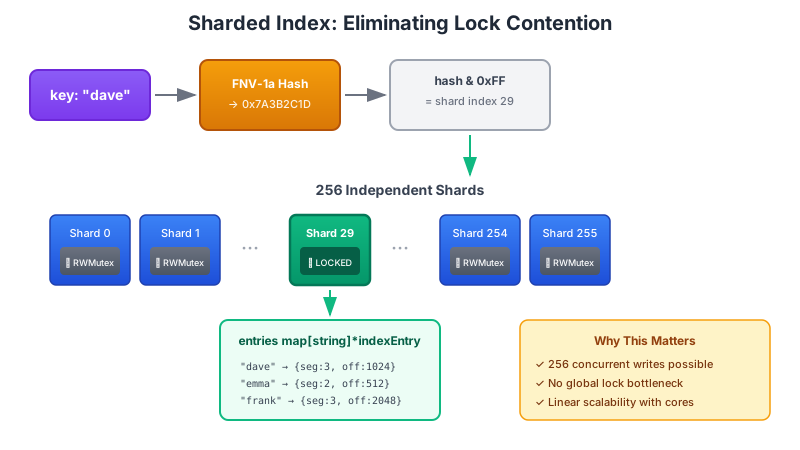
The Sharded Index Structure
const (
    // Number of shards for the index map (power of 2 for efficient modulo)
    numShards = 256
    shardMask = numShards - 1
)

// shard is a single partition of the index map
type shard struct {
    mu      sync.RWMutex
    entries map[string]*indexEntry
}

// shardedIndex is a concurrent hash map with fine-grained locking
type shardedIndex struct {
    shards [numShards]*shard
    count  atomic.Int64 // Total number of keys
}

func newShardedIndex() *shardedIndex {
    si := &shardedIndex{}
    for i := 0; i < numShards; i++ {
        si.shards[i] = &shard{
            entries: make(map[string]*indexEntry),
        }
    }
    return si
}
The choice of 256 shards (a power of 2) enables efficient shard selection using a bitmask rather than the more expensive modulo operation. The shardMask constant (numShards - 1 = 255 or 0xFF) enables this optimization.
Shard Selection with FNV Hashing
// getShard returns the shard for a given key
func (si *shardedIndex) getShard(key string) *shard {
    h := fnv.New32a()
    h.Write([]byte(key))
    hash := h.Sum32()
    return si.shards[hash&shardMask]
}
The FNV-1a hash function provides good distribution characteristics with minimal computational overhead. The bitwise AND with shardMask maps any 32-bit hash value to a shard index between 0 and 255.
Sharded Get and Put Operations
func (si *shardedIndex) Get(key string) (*indexEntry, bool) {
    shard := si.getShard(key)
    shard.mu.RLock()
    defer shard.mu.RUnlock()
    entry, exists := shard.entries[key]
    return entry, exists
}

func (si *shardedIndex) Put(key string, entry *indexEntry) {
    shard := si.getShard(key)
    shard.mu.Lock()
    _, existed := shard.entries[key]
    shard.entries[key] = entry
    shard.mu.Unlock()

    if !existed {
        si.count.Add(1)
    }
}

func (si *shardedIndex) Delete(key string) bool {
    shard := si.getShard(key)
    shard.mu.Lock()
    _, existed := shard.entries[key]
    delete(shard.entries, key)
    shard.mu.Unlock()

    if existed {
        si.count.Add(-1)
    }
    return existed
}
Each operation only locks a single shard, allowing 256 concurrent writes to different shards without contention. The atomic counter tracks the total key count across all shards without requiring a global lock.
Batch Updates for Compaction
During compaction, the engine must update many index entries atomically. A naive approach would lock each shard sequentially, but this creates unnecessary serialization. Instead, operations can be distributed to their respective shards and applied in parallel:
func (si *shardedIndex) UpdateBatch(updates map[string]*indexEntry, deletions []string) {
    type batchOp struct {
        updates   map[string]*indexEntry
        deletions []string
    }

    shardOps := make([]batchOp, numShards)
    for i := 0; i < numShards; i++ {
        shardOps[i].updates = make(map[string]*indexEntry)
        shardOps[i].deletions = make([]string, 0)
    }

    // Distribute operations to shards
    for k, v := range updates {
        h := fnv.New32a()
        h.Write([]byte(k))
        hash := h.Sum32()
        idx := hash & shardMask
        shardOps[idx].updates[k] = v
    }

    for _, k := range deletions {
        h := fnv.New32a()
        h.Write([]byte(k))
        hash := h.Sum32()
        idx := hash & shardMask
        shardOps[idx].deletions = append(shardOps[idx].deletions, k)
    }

    // Apply operations in parallel
    var deltaCount atomic.Int64
    wg := sync.WaitGroup{}
    for i := 0; i < numShards; i++ {
        wg.Add(1)
        go func(shard *shard, ops *batchOp) {
            defer wg.Done()

            shard.mu.Lock()
            defer shard.mu.Unlock()

            localDelta := int64(0)

            for k, v := range ops.updates {
                _, existed := shard.entries[k]
                shard.entries[k] = v
                if !existed {
                    localDelta++
                }
            }

            for _, k := range ops.deletions {
                _, existed := shard.entries[k]
                delete(shard.entries, k)
                if existed {
                    localDelta--
                }
            }

            if localDelta != 0 {
                deltaCount.Add(localDelta)
            }
        }(si.shards[i], &shardOps[i])

        // Yield to other goroutines every few shards
        if i%16 == 0 {
            runtime.Gosched()
        }
    }

    wg.Wait()
    si.count.Add(deltaCount.Load())
}
This parallel batch update is particularly important during compaction, where thousands or millions of index entries may need to be updated. By distributing the work across goroutines (one per shard), the operation scales with the number of available CPU cores.
Other Optimization Opportunities
While this implementation covers the core functionality of a production hash index engine, several additional optimizations are worth exploring depending on specific workload requirements.
Hint Files for Faster Recovery
The current recovery process scans all segment files sequentially, reading every record to rebuild the in-memory index. For a database with millions of keys across many segments, this can take significant time on restart.
Hint files solve this problem by maintaining a compact summary of each segment's contents. When a segment is closed (becomes immutable), the engine writes a corresponding .hint file containing only the key, offset, and size for each record—omitting the actual values. During recovery, the engine reads these small hint files instead of scanning the full data segments, reducing startup time from O(total data size) to O(number of keys).
// Hint file record format (much smaller than data records)
[KeySize][Key][Offset][Size][Timestamp]
This optimization is used by Bitcask, the storage engine that pioneered the hash index approach.
Configurable Durability with fsync
The current implementation calls sync() during segment rotation and also allows for continuous syncing via configs, but the tradeoff between durability and write performance deserves careful consideration.
Three common durability modes exist:
fsync per write: Maximum durability, but write throughput drops dramatically (often 100x slower) as each write waits for the disk to confirm persistence.
fsync per batch: Buffer multiple writes and fsync periodically (every N writes or every M milliseconds). This balances durability with performance—at most N writes or M milliseconds of data can be lost on a crash.
OS-managed flushing: Rely on the operating system's page cache and let it decide when to flush to disk. Maximum performance, but a crash can lose an arbitrary amount of recent data.
A production engine should expose this as a configuration option, allowing operators to choose the appropriate trade-off for their use case. A caching layer can tolerate data loss; a financial ledger cannot.
Memory-Mapped I/O
The current implementation uses explicit Read and Write system calls for all disk operations. An alternative approach uses memory-mapped I/O (mmap), where segment files are mapped directly into the process's virtual address space.
With mmap, reading a record becomes a simple memory access—the operating system handles paging data in and out of RAM transparently. This can improve read performance, especially for workloads with good locality, and simplifies the code by eliminating explicit read calls.
However, mmap introduces its own tradeoffs:
Less control over I/O: The OS decides when to page data in/out, which can cause unpredictable latency spikes
Address space limits: On 32-bit systems, the total mapped file size is limited; even on 64-bit systems, mapping very large files can cause issues.
Complex error handling: I/O errors manifest as signals (SIGBUS) rather than return values, requiring careful signal handling
For read-heavy workloads with datasets that fit comfortably in available RAM, mmap can provide significant performance benefits. For write-heavy workloads or datasets larger than RAM, explicit I/O often performs more predictably.
Benchmark Results
The complete implementation of this hash index storage engine is available on GitHub. Please leave a star if you check out the code.
This engine, as it is, has benchmark results comparable to those obtainable in real production systems, with room for improvement, and each component further optimized to suit specific requirements.
| Workload | Throughput | Write P99 | Read P99 | Write Amp |
| write-heavy-uniform | 129,052/s | 1.03ms | 19.4µs | 2.03x |
| read-heavy-zipfian | 545,877/s | 1.03ms | 45µs | 2.35x |
| balanced-uniform | 212,890/s | 1.03ms | 19.9µs | 2.28x |
| write-only-sequential | 129,560/s | 13.4µs | N/A | 1.59x |
Performance Characteristics
Append-only storage means writes are O(1) and super fast. In the same way, the engine knows exactly where each piece of data is stored, making reads O(1) and super fast. No tree parsing or shifting, no traversals, no heavy computations—just sequential writes and disk-seeking reads.
However, these advantages also form the limitations of the hash index:
Memory constraint: Because the engine must know exactly where each data is stored on disk, all the keys (and pointers to storage on disk) need to fit in memory. If there are more keys than can fit in memory, a hash index can't be used without additional programming gymnastics that reduce performance. If the index entries are well compacted and optimized, 2 GB of RAM is enough to hold about 45 million entries—suitable for many use cases where speed is more important than size.
No range queries: Since the hash index relies solely on the in-memory hash map, it is nearly impossible to perform range queries because the records are not sorted in any form. Any range query would require checking all keys in the database, which is impractical.
Ideal Use Cases
These fast performance characteristics make hash indexes the go-to storage mode for systems that prioritize maximum write throughput and where keys can fit in memory:
Session stores, user profiles, and configuration storage
Caching layers (Redis-like workloads)
API response caching
Log aggregation (by log ID)
Metrics storage (by metric name)
Event sourcing (by event ID)
IoT sensor data
Real-time analytics ingestion
Message queues
Dedicated cache servers
Complete code implementation is available on GitHub here. Kindly drop a star on the repo if you do visit.
What's Next?
This completes the implementation of the hash index storage engine. But what happens when storing more data than can fit keys in memory? The solution is to remove the in-memory hash map and work with the disk.
In the next part of this series, I'll build and walk through another engine that uses SSTables and LSM Trees for storage and improves upon the Hash Index.
See you there.


